Bow Commander (ZX Spectrum 128k + EsxDos)
A downloadable tool
A two-panel, Norton/Total Commander style file manager for the ZX Spectrum 128K, running on top of DivMMC/esxDOS. Written from scratch in Z80 assembler, using the Spectrum's full 128K memory paging for both code and data.
About
Bow Commander is a classic dual-panel file manager brought to the ZX Spectrum 128K. It lets you browse two directories side by side, copy, move, rename and delete files and directories, mark groups of files with wildcard masks, inspect file and directory information, and even peek inside files with a built-in Text/Hex/Decimal viewer - all from the keyboard, no mouse required (the Spectrum never had one anyway).
It is styled after the author's own earlier ZX Spectrum project, MB Commander, rebuilt for 128K machines with DivMMC/esxDOS storage.
Requirements
- ZX Spectrum 128K (or compatible: 128K, +2, +3, or a Next/clone in 128K mode).
- DivMMC (or compatible) interface running esxDOS, with an SD card / CF card / similar mass storage device formatted with a filesystem esxDOS can read.
- An emulator that supports 128K paging and esxDOS/DivMMC (for example CSpect or a recent Fuse build) also works fine for trying it out without real hardware.
Running it
Bow Commander is distributed as a single .TAP file. Copy it to your esxDOS storage and load it the normal way for a .TAP file on your system (for example via the esxDOS browser, or "LOAD" from BASIC pointed at the file). The loader brings in the resident kernel plus its overlay code banks and starts the file manager automatically.
Features
- Two independent panels, each with its own current directory, cursor position and scroll position.
- Fast directory browsing with cursor auto-repeat, page up/down, and jumping to the parent directory.
- Copy and Move, with a confirmation prompt, an overwrite guard, and safety checks that refuse to copy/move something onto itself or into its own subdirectory.
- Delete and Rename, also with confirmation.
- Make Directory.
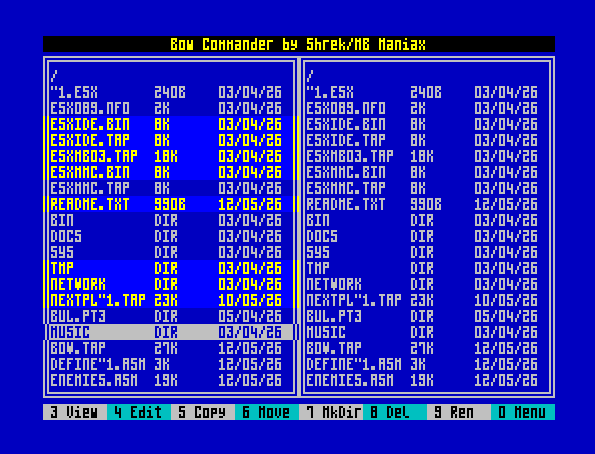
- Multi-selection: mark individual entries, or mark/unmark/invert a whole group by
wildcard mask (e.g.
*.TAP). Operations act on every marked entry if anything is marked, or just the entry under the cursor otherwise. - Quick Search: start typing a name and the cursor jumps live to the first matching entry in the current directory, narrowing further with every keystroke.
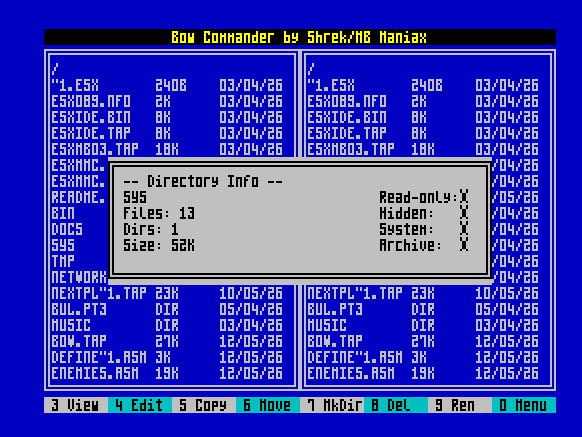
- File Info / Directory Info: size, date, time and MS-DOS style attributes (read-only/hidden/system/archive) for a file; a recursive scan (file count, directory count, total size) for a directory, cancellable with BREAK.
- System Info popup: memory size and program version.
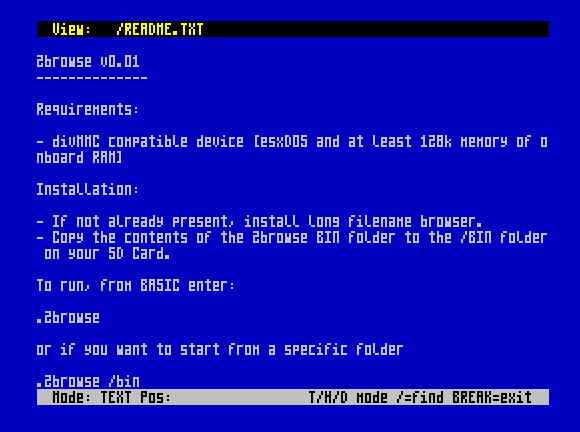
- Built-in file viewer: Text mode (with word-wrapping and fast scrolling), Hex dump and Decimal dump modes, and an incremental Find within the file.
- Built-in text editor: a proper gap buffer under the hood, so inserting or deleting text stays fast regardless of file size, and only the part of the screen that actually changed gets redrawn (never a full-screen flash for an ordinary keystroke). Held-down keys auto-repeat, Page Up/Down account for lines long enough to wrap across several screen rows, and there's word-skip, jump-to-end-of-line and jump-to-end-of-file shortcuts plus Save/Save As and its own in-editor Help popup.
- Press ENTER on a .TAP or .SNA file to load/run it directly from the panel.
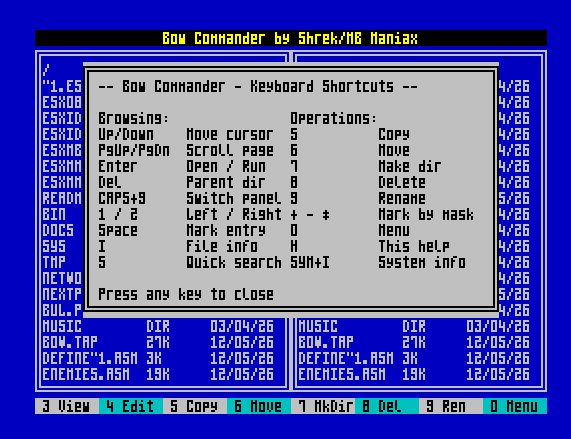
- An in-program Help screen listing every shortcut.
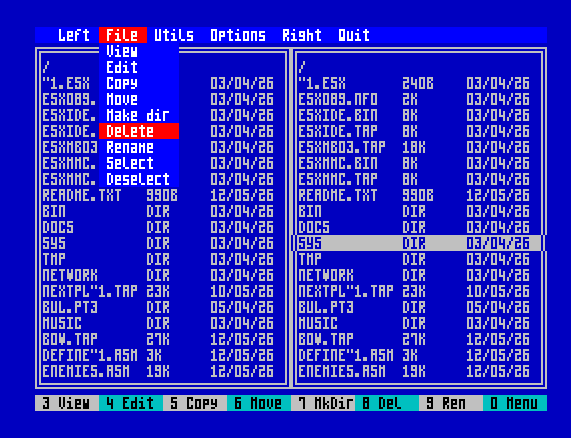
- A pull-down menu bar as an alternative to memorising every key.
- Keyboard click feedback and colour-coded panels/highlights throughout.
Controls
The Spectrum's own keyboard has no arrow keys, so Bow Commander uses the classic CAPS SHIFT + 5/6/7/8 convention for cursor movement (5=left/up-page, 6=down, 7=up, 8=right/down-page), the same convention used by countless 128K-era programs.
Browsing
- Up / Down (CAPS SHIFT + 7 / 6) - move the cursor (auto-repeats while held)
- Page Up / Page Down (CAPS SHIFT + 5 / 8) - scroll a full page
- ENTER - open the highlighted directory, or run a highlighted .TAP/.SNA file
- DELETE (CAPS SHIFT + 0) - go up to the parent directory
- 1 / 2 - jump focus straight to the left / right panel
- CAPS SHIFT + 9 - switch focus between the two panels
- S - Quick Search (type to jump; Up/Down still move the cursor while searching; ENTER or BREAK ends the search)
Selection
- SPACE - mark/unmark the entry under the cursor and move down
- SYM SHIFT + K ("+") - mark entries matching a wildcard mask you type
- SYM SHIFT + J ("-") - unmark entries matching a mask
- SYM SHIFT + B ("*") - invert all marks in the current panel
Operations
- 5 - Copy (destination is the other panel's current directory)
- 6 - Move
- 7 - Make Directory
- 8 - Delete
- 9 - Rename
- BREAK (CAPS SHIFT + SPACE) - cancel any confirmation prompt or running operation
Information & help
- I - File Info / Directory Info
- SYM SHIFT + I - System Info
- H - this program's own Help screen
- 0 - open the pull-down menu bar
File viewer
3 opens the built-in viewer on the file under the cursor. Inside the viewer:
- Up / Down, Page Up / Page Down - scroll (same CAPS SHIFT convention)
- T - Text mode
- H - Hex dump mode
- D - Decimal dump mode
- SYM SHIFT + / - Find a string in the file
- BREAK - exit back to the file manager
File editor
4 opens the built-in editor on the file under the cursor (or a new, empty file over an empty directory entry). Inside the editor:
- Typing inserts text at the cursor as usual, including the SYM SHIFT punctuation
this project supports (
: / , . ? * - _); held-down keys auto-repeat, same as on a normal keyboard. - ENTER - split the line at the cursor
- DELETE (CAPS SHIFT + 0) - delete the character before the cursor
- Up / Down / Left / Right (CAPS SHIFT + 7/6/5/8) - move the cursor, auto-repeats while held
- Page Up / Page Down (CAPS SHIFT + 5/8, or CAPS SHIFT + 4/3 using the keycap's own INV VIDEO/TRUE VIDEO legends) - scroll a full screen; correctly counts screen rows even when long lines wrap across several of them
- SYM SHIFT + Q / SYM SHIFT + R - jump a word left / right
- SYM SHIFT + E - jump to the end of the current line
- SYM SHIFT + I - jump to the end of the file
- SYM SHIFT + W - Save
- SYM SHIFT + A - Save As
- CAPS SHIFT + 1 (the keycap's own EDIT legend) - this editor's own Help popup, spelling out every shortcut above
- BREAK - exit; if there are unsaved changes, asks whether to save, discard, or cancel
Status
Bow Commander is an active, evolving hobby project (currently v0.9) - features and shortcuts may still change between releases. Bug reports and feedback are very welcome.
Credits
Program: Shrek / MB Maniax, 2026.
Download
Click download now to get access to the following files:
Comments
Log in with itch.io to leave a comment.
Cool stuff.....it will be nice if it can also work with Dandanator MTD with SD card
Sorry, I don't own this hardware...
Nice work! But how about LFN, secondary SD card support?
A second disk is planned. The problem with LFN is that they take up a lot of memory for the loaded directory, but I want to look into that too. I just have chores at home in the garden now... ;)