CalmCommander (ZX Spectrum Next)
A downloadable game
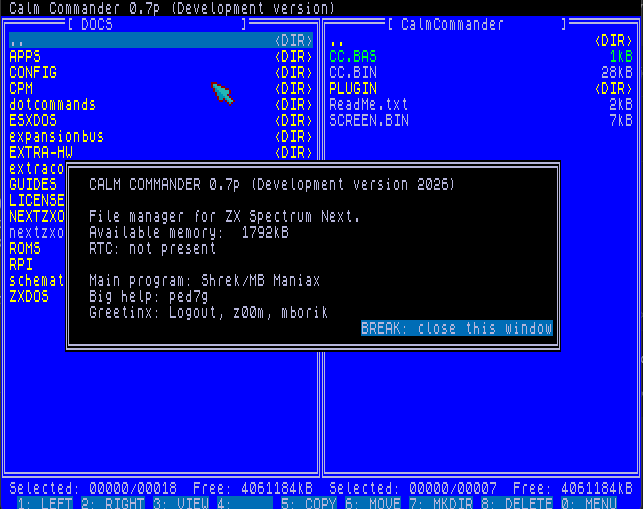
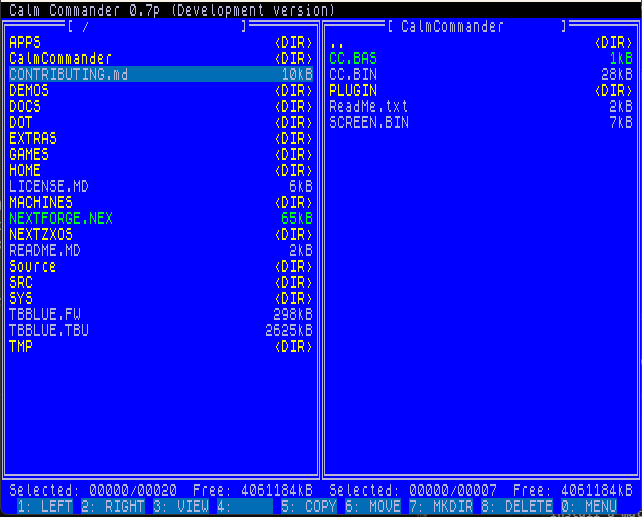
Calm Commander is a dual-panel file manager for ZX Spectrum Next, built for fast work with files, directories, disks, and runnable formats.
ZX Spectrum Next / NextZXOS / dual panel / mouse support / viewer plugins
Commander-style file work on the Next
Calm Commander brings a classic two-panel workflow to ZX Spectrum Next: left and right panels, keyboard-driven navigation, copying, moving, deleting, renaming, and directory management.
The project is still in development, but it already handles everyday file-management tasks, launching common file formats, and modular file viewing through external plugins.
Features
- Two panels: left and right file panels for copying, moving, and comparing directories.
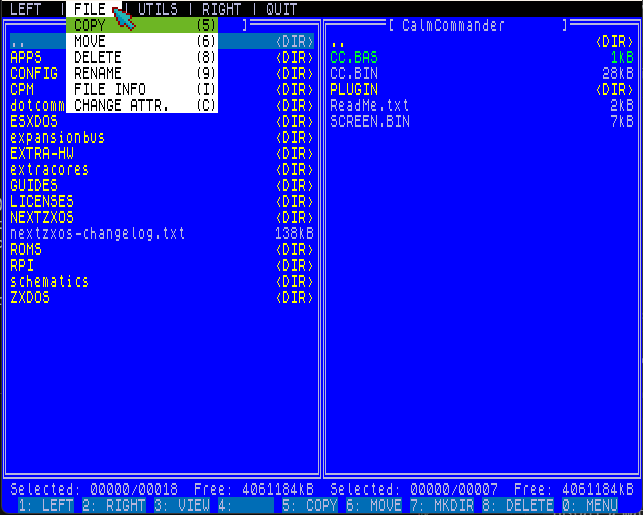
- File operations: copy, move, delete, rename, create directories, and select multiple files.
- Run files: supports common formats such as BAS, TAP, NEX, SNA, SNX, and Z80.
- Search and select: find files by name and select or deselect matching entries.
- File details: view size, date, time, attributes, and other details for the selected item.
- Viewer plugins: text files, ZX screens, and other formats can be handled by external viewers.
Controls
Calm Commander is designed for quick keyboard use and also supports mouse interaction. The main actions are shown in the bottom command bar.
- 1 - switch to left panel
- 2 - switch to right panel
- 3 - open viewer plugin
- 5 - copy file
- 6 - move file
- 7 - create directory
- 8 - delete selected item
- 0 - open menu
Modular file viewers
The viewer system loads an external plugin based on the selected file type. The text viewer supports line and page scrolling; the ZX screen viewer displays 6912-byte Spectrum screens.
Download
Click download now to get access to the following files:
Comments
Log in with itch.io to leave a comment.
I don't have Next, and I don't plan on getting it, but I'm keeping an eye on the development of this "Commander". I hope it turns out so great that it'll launch by default every time the system starts up!
You can set this up today by adding a startup entry to autoexe.1st (or whatever the file is called), or by editing the Next menu....
And thank you so much for your words of support...
Hi, might just be me, but the viewer plugin is not working for me, if I try and view a file that it should be able to read, such as a text file. It appears to try, but nothing happens except for some screen artifacts seen momentarily. Files it can't view behave correctly, as I get the big red box as expected.
I'm running the latest NextOS and firmware.
Hi, where did you copy CalmCommander to on your drive?
It should be here: C:\CalmCommander
and the plugins should be here: C:\CalmCommander\plugin\
This will change in the future, and they’ll be able to be located anywhere, but for now, this is the "fixed" setup.
Ah!
Thank you, that was my mistake. I obviously missed that in the instructions :-)
Thank you for the speedy answer too!
You're welcome. If you run into any other issues, let me know.
Otherwise, I already have some other plugins ready (music plugins—PT3, PT2, SQT, STC, STP..., an NXI viewer, and an SCR image viewer :) )