.paper
A downloadable tool
A fast, compact text editor for the ZX Spectrum 48K and 128K, running on top of DivMMC/esxDOS. It installs as a single esxDOS dot command - about 6.5 KB - and edits a file straight from BASIC, with room for a document of nearly 40 KB. Written from scratch in Z80 assembler.
About
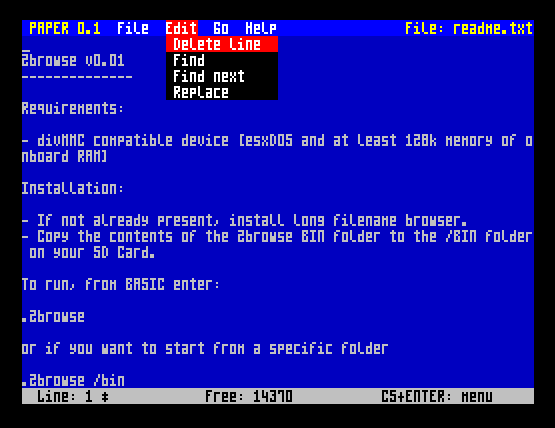
PAPER is a plain text editor for real work on a real Spectrum: 64 columns by 22 rows of text, a pull-down menu bar, find and replace, and a status line telling you which line you are on, how much room you have left, and whether there is anything unsaved. No mouse, no mode switching, no waiting.
Under the hood it keeps the whole document in a gap buffer - the same technique behind most classic text editors. The file's bytes are held as [text before the cursor][an unused gap][text after the cursor], with the gap kept exactly at the cursor, so typing a character or deleting one is a constant-time operation no matter how big the file is. The naive alternative - shifting the entire rest of the file by one byte on every keystroke - is exactly what makes editing a large file crawl on an 8-bit machine.
Redrawing is just as careful: an ordinary keystroke repaints only the row that actually changed, and moving the cursor repaints only the cursor mark itself, so you never get a full-screen flash for typing a letter.
The document lives in BASIC's own spare RAM - the memory between the end of its workspace and its stack, which is sitting idle for as long as a dot command is running. PAPER measures that gap at startup and takes all of it, which is why a freshly switched-on machine gives you nearly 40 KB to write in, and why the same build runs on a 48K and a 128K alike without touching the machine's memory paging at any point.
The editor core comes from the author's own file manager, Bow Commander, rebuilt as a standalone dot command so it can be used without loading the whole file manager first.
Requirements
- ZX Spectrum 48K or 128K (or compatible: 48K, 128K, +2, +3, or a Next/clone). PAPER keeps the document in BASIC's own spare RAM rather than in a 128K memory bank, so it does not care which machine it is on.
- DivMMC (or compatible) interface running esxDOS, with an SD card / CF card / similar mass storage device formatted with a filesystem esxDOS can read.
- An emulator supporting esxDOS/DivMMC (for example CSpect or a recent Fuse build) also works fine for trying it out without real hardware.
- Enough free RAM to be worth editing in - at least 2 KB. On a machine that has just been switched on there is close to 40 KB; a large BASIC program in memory leaves correspondingly less. PAPER measures what is actually free at startup and says so plainly rather than misbehaving if there is too little.
Installing and running it
PAPER is distributed as a single esxDOS dot command file named PAPER
(no extension). Copy it into the /BIN directory of your esxDOS storage -
the same place your other dot commands live - and then run it from BASIC:
.paper readme.txt- open a file for editing.paper /docs/notes.txt- a full path works too.paper "my file.txt"- quote any path containing a space or a colon
If the file does not exist, PAPER starts with an empty document and creates the
file when you save. A filename is required; running .paper on its own
just prints a usage line.
When you leave the editor you are returned straight to BASIC, with the machine in the state it was in beforehand.
Features
- 64 columns by 22 rows of text, using a compact 4x8 pixel font.
- Gap buffer document storage - inserting and deleting stay fast regardless of file size.
- Partial redraw: typing repaints one row, cursor movement repaints one character cell, so the display never flashes for an ordinary keystroke.
- Long lines wrap across as many screen rows as they need, and Page Up/Page Down count actual screen rows rather than logical lines, so a page really is a page.
- Held-down keys auto-repeat for typing, deleting and cursor movement. Commands deliberately do not repeat, so holding one down cannot run away with the document.
- Find, Find Next and Replace (see below).
- Delete the whole line the cursor is on.
- Word-skip left/right, jump to the end of a line, jump to the start/end of the file. Jump to the start of a line is on the Go menu.
- Save and Save As, with a path prompt on the status line. Save As also retargets the plain Save from then on.
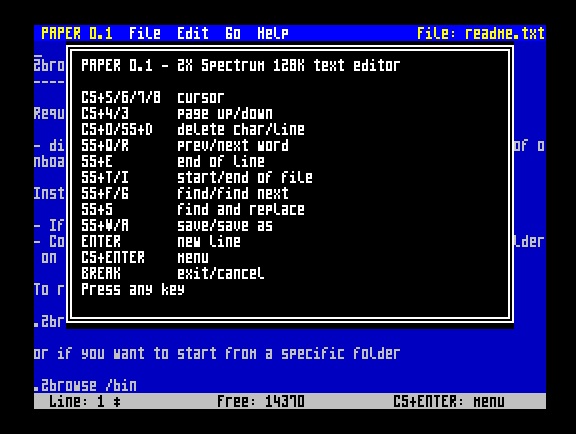
- Pull-down menu bar (File / Edit / Go / Help) as an alternative to memorising the shortcuts, plus an in-editor Help popup listing every key.
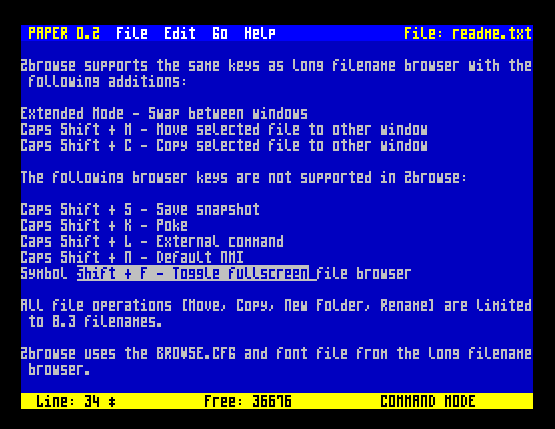
- Status line showing the current line number, the number of bytes still free to type into, and an asterisk while there are unsaved changes.
- Leaving with unsaved changes asks whether to save, discard, or cancel.
- Keyboard click feedback.
Controls
The Spectrum's own keyboard has no arrow keys, so PAPER uses the classic CAPS SHIFT + 5/6/7/8 convention for cursor movement, the same convention used by countless 128K-era programs.
Typing
- Letters, digits and space type as usual; hold CAPS SHIFT for capitals.
- SYM SHIFT gives punctuation:
! @ # $ % & ' ( ) _ : ? / * , . ^ - + = " ; - ENTER - split the line at the cursor
- DELETE (CAPS SHIFT + 0) - delete the character before the cursor
- SYM SHIFT + D - delete the whole line the cursor is on
Moving around
- Left / Down / Up / Right (CAPS SHIFT + 5 / 6 / 7 / 8) - move the cursor, auto-repeats while held
- Page Up / Page Down (CAPS SHIFT + 4 / 3, using the keycap's own INV VIDEO/TRUE VIDEO legends)
- SYM SHIFT + Q / SYM SHIFT + R - jump a word left / right
- SYM SHIFT + E - jump to the end of the current line
- SYM SHIFT + T / SYM SHIFT + I - jump to the start / end of the file
Find and replace
- SYM SHIFT + F - Find: type the text and press ENTER
- SYM SHIFT + G - Find Next: repeat the last search without retyping it
- SYM SHIFT + S - Replace: asks for the text to find and the text to put in its place
Files, menu and exit
- SYM SHIFT + W - Save
- SYM SHIFT + A - Save As
- CAPS SHIFT + 1 (the keycap's own EDIT legend) - Help popup listing every shortcut
- CAPS SHIFT + ENTER - open the pull-down menu bar
- BREAK (CAPS SHIFT + SPACE) - exit, or cancel the current prompt or menu
More about find and replace
Matching is case-insensitive. A Spectrum keyboard charges you a CAPS SHIFT for every capital, and a Find that misses because of one is a Find that mostly annoys. Replacement text is inserted exactly as you typed it.
Find starts just past the cursor and wraps round to the top of the document when it runs out, so Find Next cycles through every occurrence instead of dead-ending at the last one. If the text is nowhere in the document, PAPER says so and leaves the cursor alone.
Replace asks for both strings and then changes every occurrence from the cursor to the end of the document, reporting how many it changed. Press SYM SHIFT + T first if you mean the whole file. There is no undo - but nothing reaches the SD card until you save, and leaving with unsaved changes still offers to discard them.
Limits
- How big a document can get depends on how much RAM is free when PAPER starts - close to 40 KB on a machine that has just been switched on, less if a BASIC program is sitting in memory. The status line's Free figure is the exact number of bytes left at any moment, and typing stops rather than overflowing when it reaches zero.
- A file is only loaded if it fits with 256 bytes to spare, so there is always something to type into. Anything larger is refused rather than silently truncated.
- Lines are separated by a single LF (character 10). A stray CR is carried along harmlessly but is not treated as a line break.
- Tabs are shown as spaces; other control characters are shown as a dot. Both are preserved in the file exactly as they were.
Status
PAPER is an active hobby project (currently v0.1) - features and shortcuts may still change between releases. Bug reports and feedback are very welcome.
Download
Click download now to get access to the following files:
Development log
- paper 0.23 days ago
Comments
Log in with itch.io to leave a comment.
Excellent work :)
Will it be integrated with bow commander?
And did you think about supporting the 128k memory for bigger files or even "stream" from and to esxDOS and internal memory?
I plan to support 128k of memory when it becomes available.
There’s already an editor in Bow Commander, it just lacks a few features from the paper. In the next few days, however, I’ll be releasing a version where Bow Commander will include the latest editor features as per the paper, plus – of course – some extra functions (settings, colour scheme, bookmarks, etc.).
I don’t really want to support DivMMC memory for data – because, for example, in DivIDE (where EsxDos can also be run), this memory isn’t available… For now, I mainly want to focus on the editor’s features…
Good to hear.
For divMMC I was actually thinking more thinking of loading a block from disk to Speccy memory, show/edit it and writing it back, like a kind of buffer. This way a huge file could be created and edited.
Just an idea :)
That won't work at all. Because if you write something at the beginning of the file, the rest of the file will be shifted by the X bytes you wrote... Or rather, it would be possible, but it wouldn't be the fastest...